← All work
AI-Guided Environment Validation · Pearson VUE · Computer vision

Candidate-led capture with AI triage and a human handoff designed before the happy path.

AI-Guided Environment Validation explored replacing four static room photos with one guided mobile video, computer-vision issue detection, candidate self-correction, and a human greeter handoff during OnVUE check-in. I led end-to-end product design for the validated proof of concept. A 70% issue-detection rate and a maximum 20% false-positive rate were experiment targets, not production outcomes.

Computer vision UXAI triageHuman-in-the-loop
// BEFORE / AFTER

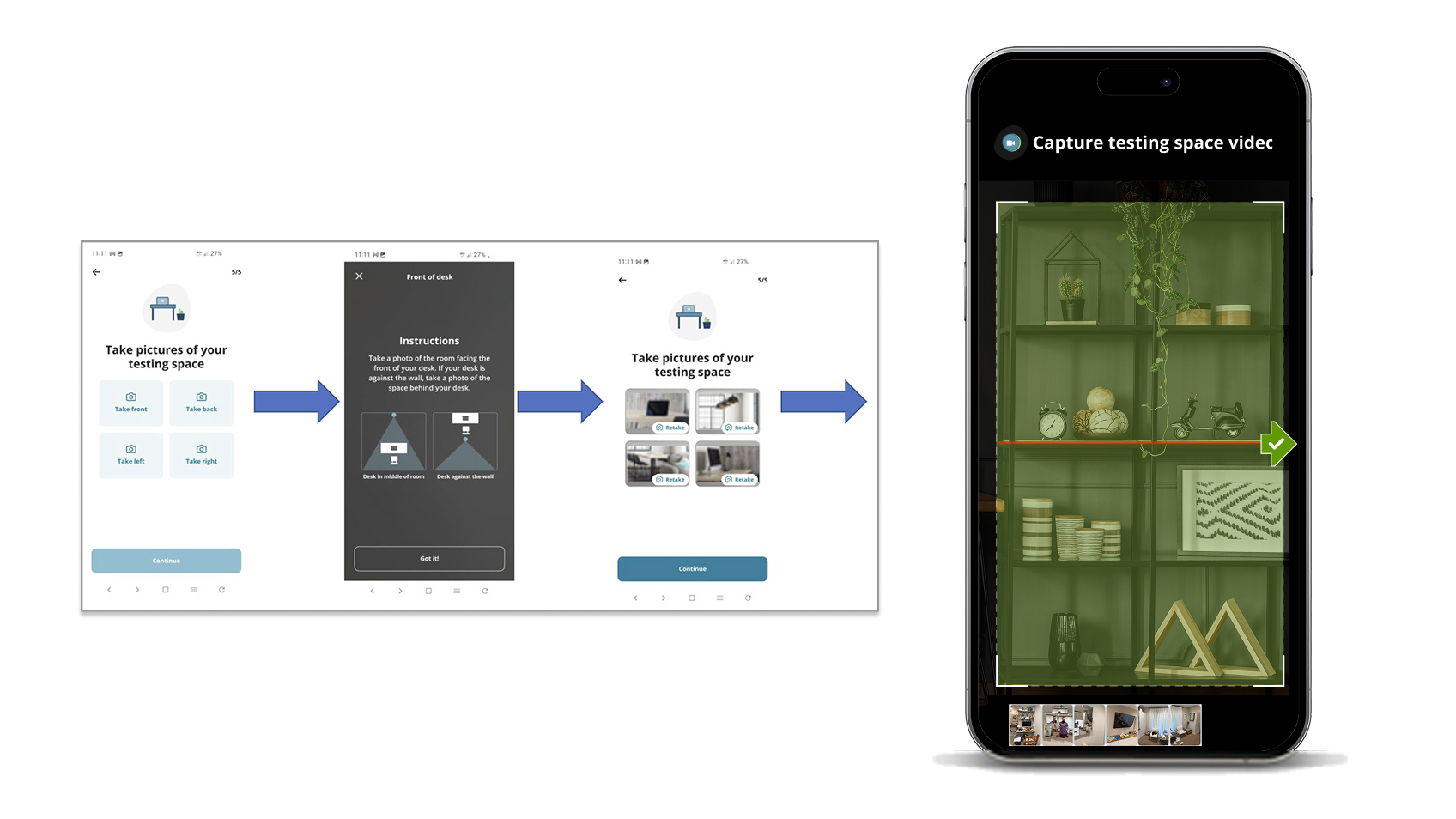
From static room photos to AI-guided 360-degree validation.

Four-photo environment validation
AI-guided environment-validation video capture
BeforeAfter
// RoleSenior Product Designer · Lead IC
// ScopeMobile capture + desktop greeter
// SurfaceMobile web · iOS + Android
// Model targets70% detection · ≤20% noise
// UsersCandidates · Greeters
// StatusValidated · proof of concept
70 / ≤20Detection target /
false-positive ceiling
4.1 / 5Issue-results page
rated highest by users
iOS + Android3 of each tested
across 6 participants
// PROTOTYPE WALKTHROUGH

See capture, correction, and handoff.

01

A candidate's phone, an AI model, a greeter, and a desktop check-in, coordinated as one step.

AI-Guided Environment Validation explored replacing a clunky four-photo desktop process with a mobile-captured 360° video. The concept analyzed the scan and routed it to one of three states: green approved, yellow review, or red problem. Each state gave the greeter a specific UI and the candidate a clear path forward.

FIGURE 01 // Triage architecture

The candidate-mobile to greeter-desktop triage path

A single capture flows through AI vision analysis and is classified onto a traffic-light scale. Every state preserves a path forward for both the candidate and the greeter, including when the AI is wrong.

AI-Guided Environment Validation triage architecture: mobile capture, AI vision analysis, traffic-light triage, parallel paths for green, yellow, and red, and greeter review. The candidate's mobile device captures a 360-degree video. AI vision analyzes for desk presence, monitor count, and prohibited items, producing a traffic-light classification. Each color routes to a different desktop check-in or greeter handling path. 01 · CAPTURE 02 · AI VISION 03 · TRIAGE 04 · OUTCOME 360° MOBILE WEB Candidate captures video AI · COMPUTER VISION Checks: → Video length in range (8 to 12s) → Desk / workspace surface present → Single monitor / laptop → Prohibited items (mobile, calc.) Target: 70% detection Max: 20% false-positive G GREEN · APPROVED All checks passed Candidate continues Y YELLOW · REVIEW AI cannot run Greeter views video R RED · PROBLEM Persistent fail · candidate proceeds, flagged DESKTOP CHECK-IN Candidate advances No greeter intervention GREETER DASHBOARD Reviews front photo + video Marks AI true / false GREETER DASHBOARD Reviews + problem frames + specific failure reason // REVIEW · GREETER RECORDS TRUE / FALSE CANDIDATE RECOVERY PATHS A · RETRY (CONFIG.) Configurable max attempts. Each retry shows what failed. B · SKIP TO GREETER Available after 2 failed attempts. Routes to human assistance. C · PERSISTENT FAIL Candidate proceeds (not blocked). Marked RED for greeter context. D · AI OPT-OUT Per client / region. Marks YELLOW. Full human review path. DESIGN RULE · PERSISTENT AI FAILURE NEVER PERMANENTLY BLOCKS THE CANDIDATE
Approved · advance Review · greeter handoff Problem · proceed flagged Greeter review loop
// READ AS

The triage classifier had to be honest about its own uncertainty. GREEN moves the candidate forward without human intervention; YELLOW routes everything the AI could not score to a person; RED does not block the candidate. It gives the greeter the exact problem frames and the specific failure reason. The greeter records whether the signal matched the evidence.

02

The legacy four-photo flow failed candidates before the exam began.

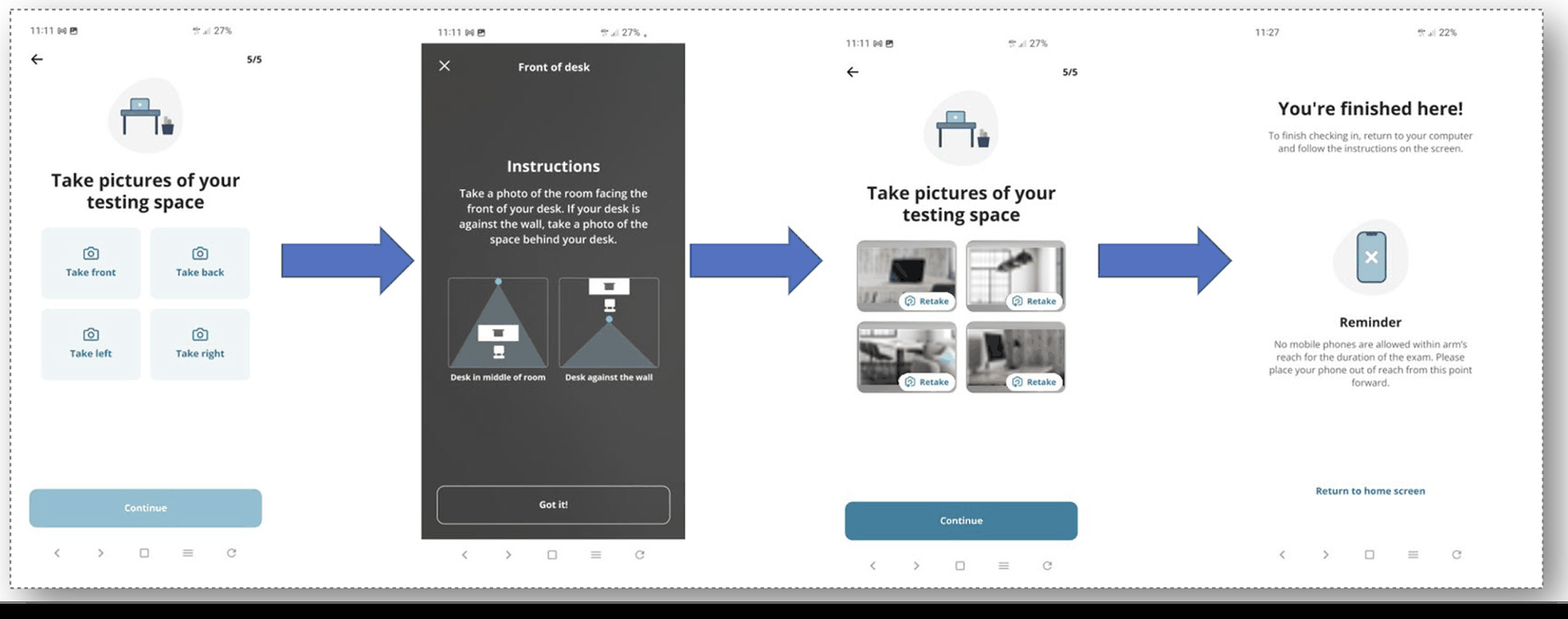
The existing check-in required candidates to capture four desk photos. Many candidates failed that step, which triggered time-consuming 360° scans by human greeters. That increased greeter cost, raised candidate anxiety, and slowed the pipeline. Clients wanted stronger security without spending live-agent minutes on every check-in.

The constraint that mattered most: the system had to remain candidate-tolerant. A test-taker whose camera cannot hit the focus or whose hand is not steady cannot be permanently locked out of a high-stakes credential they paid for. Persistent AI failure had to remain a recoverable state.

03

Six participants, two devices each, and a clear pattern of first-attempt failure.

The usability study ran with six internal participants using their own phones. Three used Android and three used iPhone, with a deliberate mix of newer and older devices. Sessions were 45 minutes, remote, and recorded. The product was in proof-of-concept state.

The single most consequential finding: zero participants succeeded on their first scan. Every participant restarted between one and four times before completing. The scanner was too sensitive, the "you're doing great" encouragement obscured failure, and several users did not realize they had to restart at all.

"If I was making progress I'd want to try again, but I'd also want the option to indicate that I need to talk to a greeter because I'm having a problem with the scanner. I would expect that after the second time, I'd be redirected to a greeter. If they made me do it a third time, I'd start to get frustrated and think the system's broken." Three participants, independently, on max-retry tolerance

Ratings across the flow were specific. The issue-results page scored 4.1 / 5, overall experience scored 3.8 / 5, requirements scored 3.6 / 5, and the scanner scored 3.4 / 5. The scanner, which was the AI surface, rated lowest. The issue-results page, which was the explanation surface, rated highest. The research showed which part of the system was working and which part needed more work.

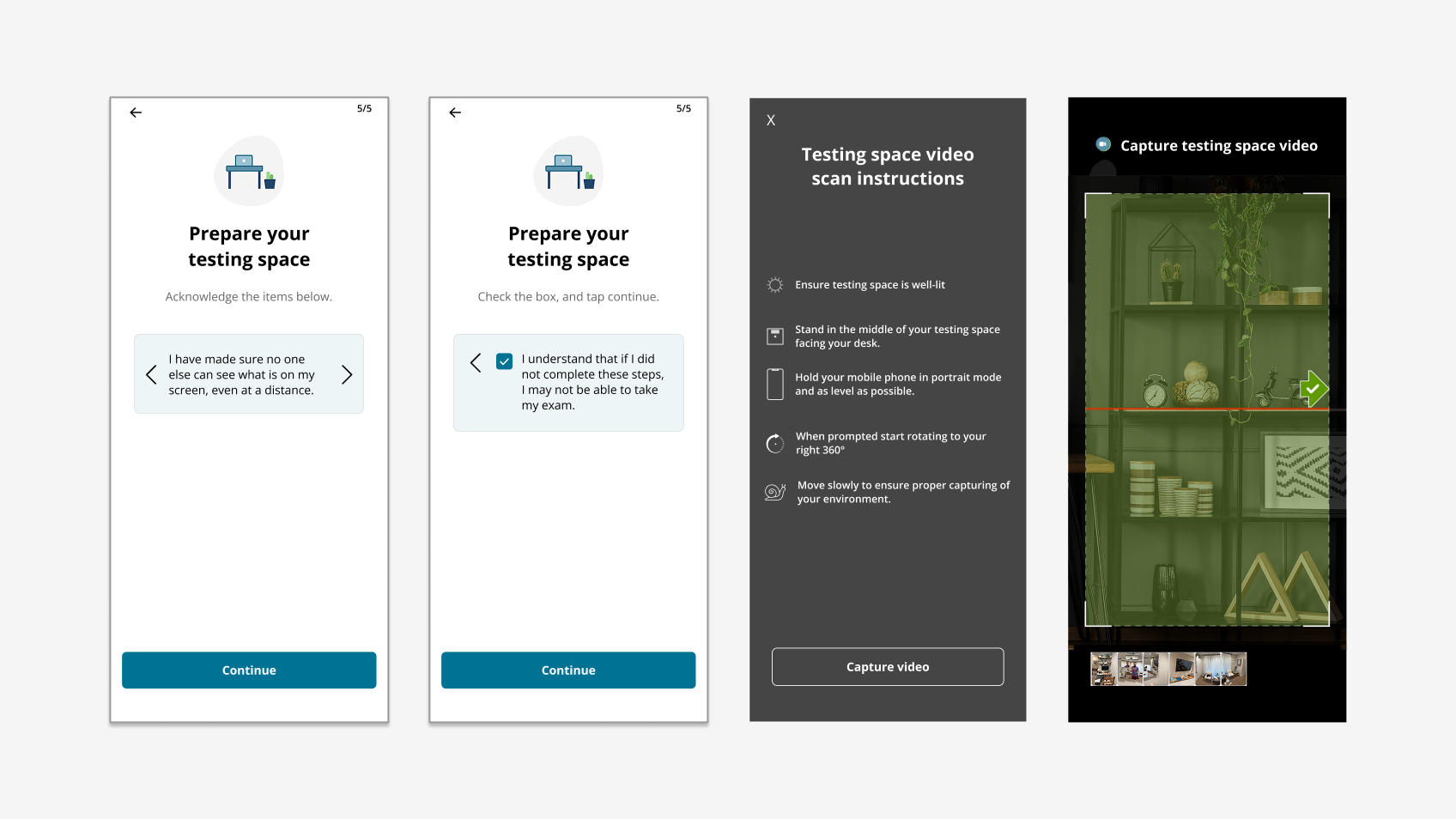
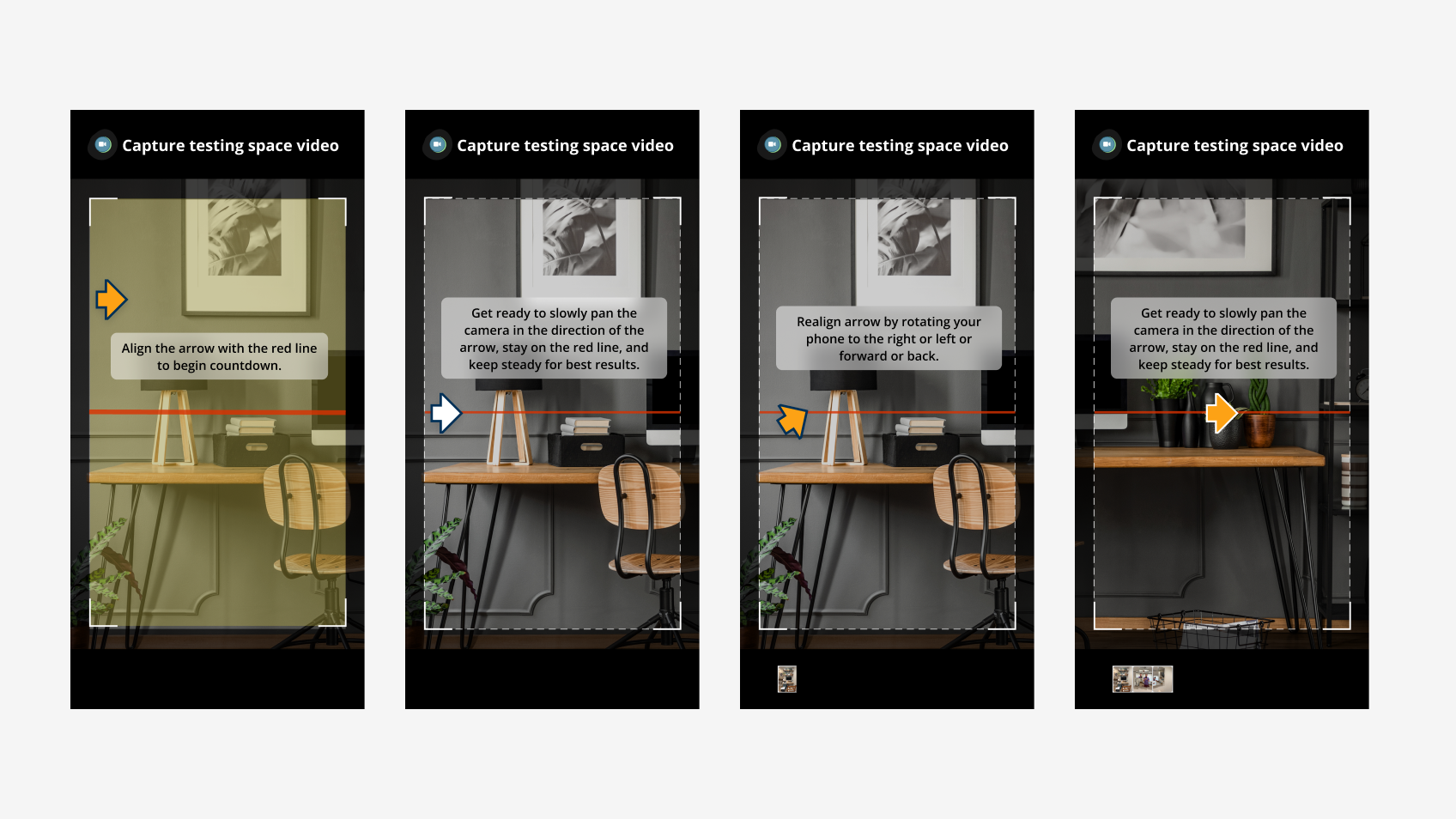
Environment-validation capture guidance
04

Three states with bounded retry and a guaranteed human exit.

The model is not the AI itself. It is the policy around the AI. The state machine below governs what happens when a candidate scans, retries, or asks for help.

FIGURE 02 // State machine

The retry & recovery state machine

The model uses bounded retry, explicit human handoff, and no silent persistence failure.

State machine showing the environment-validation retry and recovery logic, with bounded retries, candidate-initiated skip-to-greeter, and persistent failure handling. The state machine starts with scan attempt, branches on pass or fail, allows configurable retries, exposes a candidate-initiated skip-to-greeter option after the second failure, and falls back to a flagged-proceed state after the maximum retries. START Scan attempt AI EVAL Pass? YES GREEN · APPROVED Advance check-in NO FEEDBACK + RETRY Show what failed attempt < max? RETRY ATTEMPT ≥ 2 → OFFER "Skip to greeter" candidate-initiated YELLOW · REVIEW Greeter handles PERSISTENT FAIL · MAX RETRIES HIT RED · PROBLEM Proceed flagged candidate not blocked STATE MACHINE · ENVIRONMENT VALIDATION // INVARIANT The candidate always has a path forward. Retry, escalate to human, or proceed flagged, the AI never owns a terminal "fail" state.
// READ AS

After two failed attempts, the candidate can choose a greeter handoff. After the maximum number of attempts, the candidate proceeds as flagged, not blocked. This was the research-driven invariant: persistent AI failure does not own a terminal state.

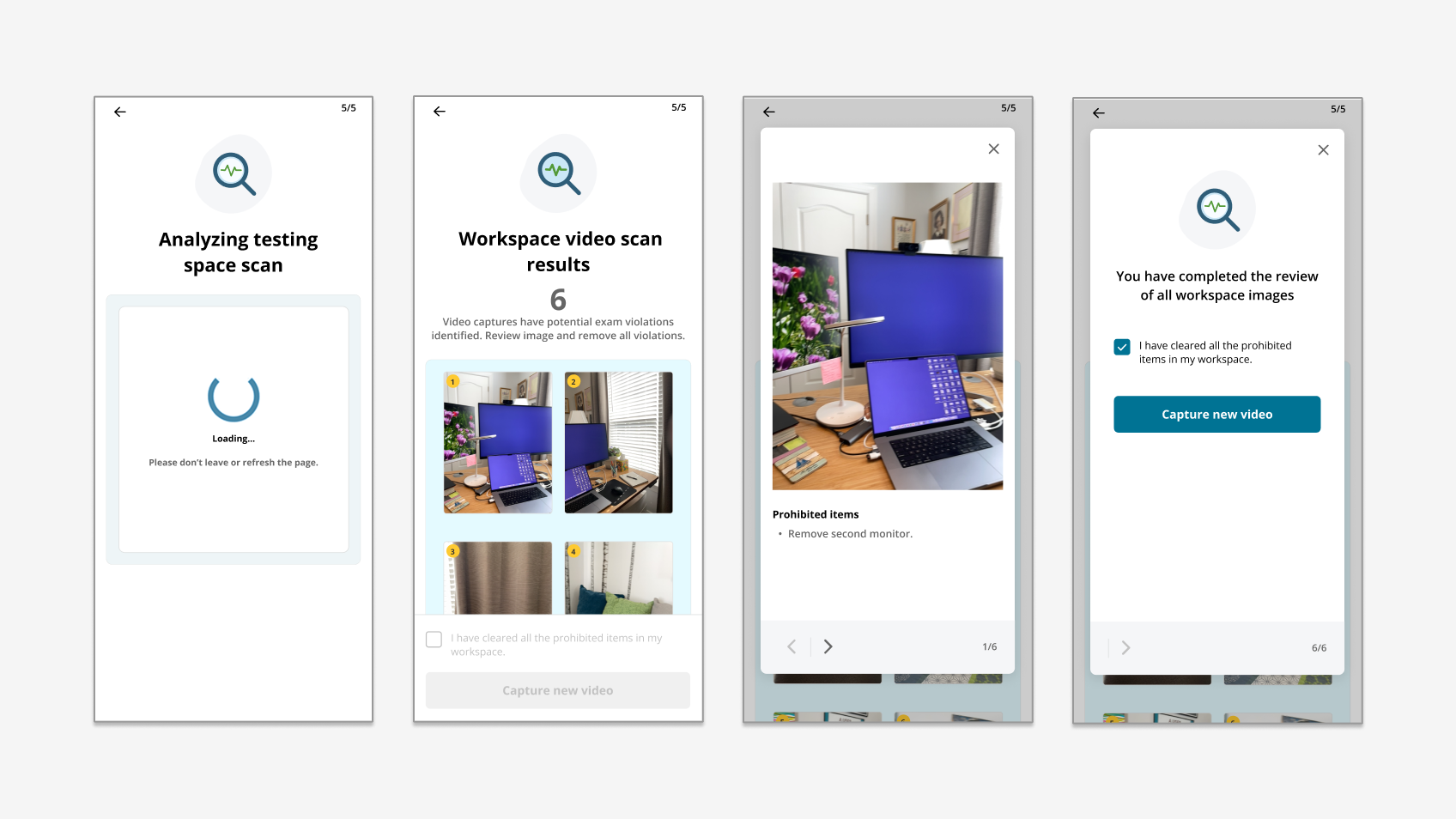
Workspace validation result states
05

Six interaction decisions made the AI legible to candidates and greeters.

01

Honest in-scan feedback, not encouragement.

I replaced "you're doing great" with explicit states such as capturing, problem detected, and restart needed. Candidates could see when the scan had failed, and motion guidance was tested through animation rather than text alone.

02

Specific failure reasons on the issue-results page.

The single highest-rated screen in the study (4.1 / 5). Each detected problem was a labeled card with a frame of the moment, the AI's reason, and the fix the candidate could try.

03

Skip-to-greeter exposed after attempt 2.

The user research aligned: two retries is the tolerance window. The button does not appear on the first failure (where retry is fine) but is visible on the second (where research said frustration spikes).

04

Persistent failure proceeds, does not block.

The candidate's exam is not held hostage by an AI confidence threshold. Red-marked sessions surface to the greeter with the problem frames and the failure reason, ready for human judgment.

05

Greeter true / false review on every AI outcome.

The greeter dashboard included a one-tap "AI was right" / "AI was wrong" response. This made disagreement visible in the operating workflow and preserved a structured review record.

06

Configurable per client.

Video length range, max retry count, AI opt-out, and the threshold for skip-to-greeter were all configurable. Different exam programs balance security and cost differently. The product had to flex.

06

What each system has to do when each state fires.

State Mobile capture surface AI engine signal Desktop check-in Greeter dashboard
GREENConfirms capture · returns to desktopAll checks passedAuto-advances candidate(no surface; routed past)
YELLOWShows "human review next"AI could not score · opted outPauses for greeterFront photo + video · greeter views & rates
RED · 1st failIssue-results page · retry CTASpecific problem frames + reasonHolds at workspace step(not yet surfaced)
RED · 2nd failRetry CTA + "skip to greeter"Same problem setHolds at workspace step(not yet surfaced)
RED · max failProceed CTA · "flagged" noticePersistent fail signalAdvances candidateFront photo + video + problem frames + failure reason · ready for greeter judgment
Skip · self-select"Help on the way" stateTriage haltedPauses for greeterGreeter receives video + the candidate's own note about the problem
07

The research findings shipped as changes before the next test round.

// VALIDATION · FINDING → RESPONSE → STATUS
// MethodModerated remote · candidates
// Sample6 internal · 3 Android + 3 iPhone
// DateJuly to Aug 2025
// Issue page4.1 / 5
// Overall3.8 / 5 (POC)
// First-try success0 / 6 · all restarted 1 to 4×
// Finding// Design response// Launch
"You're doing great" message during failure was misleading.
Replaced with explicit state ("Problem detected · restart needed") + stop-sign visual cue.
Updated
Users wanted skip-to-greeter after 2 failed attempts (max).
Added candidate-initiated skip CTA at attempt 2; never appears on attempt 1.
Updated
Prepare instructions felt disconnected from prior emails.
Tied prepare-screen copy back to the pre-exam email; reinforces rather than re-introduces.
Updated
Numbered the sequence of events; requirements lacked structure.
Added explicit step numbering ("Check-in 5 / 5") + numbered requirements list.
Updated
Standing vs sitting unclear; some users missed the whole desktop in video.
Added animation showing required motion; revised the "go back to desktop on restart" instruction.
Updated
Issue-results pictures did not look clickable, scroll affordance unclear.
Added visual lift on result cards + sticky scroll indicator on long issue lists.
Updated
Native phone app may yield a better scan than mobile web.
Documented for roadmap; deferred pending POC outcome.
Roadmap
Workspace validation retry and recovery flow
08

A clearer experiment and a safer recovery model.

The validated proof of concept showed that candidate-led video capture required strong choreography and that issue detection was only one part of the product. In the referenced study, the issue-results screen rated 4.1 / 5 and the scanner UI rated 3.4 / 5, giving the team a clear target for the next iteration.

The more important design contribution was a bounded recovery model that prevented persistent uncertainty from becoming a permanent candidate block. It treated AI as a signal, preserved candidate agency, and made a human exit part of the primary workflow.

// THE LESSON I CARRY FORWARD

An AI product earns credibility by handling errors clearly. In this kind of workflow, the recovery paths are part of the product.

09

Patterns that traveled with me.

// PATTERN

Traffic-light triage

The three-state classifier with bounded retry can be reused across check-in, identity, and admissions workflows.

// PATTERN

Bounded retry, explicit human exit

The candidate can always reach a person. The AI does not own a terminal fail state.

// PATTERN

Greeter true / false review

Disagreement is recorded in the operational UI instead of hidden in a separate process.

// PATTERN

Issue-results > scanner UI

The explanation surface can matter more than the capture surface. People are more willing to tolerate friction when they understand why it is happening.

Next case study · OnVUE Remote Proctoring

OnVUE Remote Proctoring

A 10-stage cross-device journey unified desktop, mobile web, and native flows with three handoff paths and presence-sync recovery.

Read case study
// Have a complex product problem?

Get In Touch