← Selected Work
Global Certification Portal
Case Study

Redesigning a Global Certification Portal for 200K+ Monthly Users

How a 5-day cross-functional design sprint and a 9-candidate validation study modernized a text-heavy certification portal into a role-aware, conversational experience that reached 4.5 / 5 user satisfaction across registration, pathways, and conversational help.

Legacy ModernizationDesign SprintsConversational UXUsability TestingEnterprise SaaSFigma
Role & Responsibilities
Senior Product Designer - co-led the 5-day design sprint with a 14-person cross-functional team
End-to-end UX, prototyping, usability testing, and phased delivery planning
Partnered with Product, Engineering, Customer Support, Marketing, International, and CX Research
Users & Scope
Primary: Academic candidates - high school and college students earning industry-recognized certifications
Secondary: Self-directed candidates pursuing career-path certifications
Scope: Account creation, profile, dashboard, pathways, transcript and certificates, virtual assistant, study plan
High-Level Impact
Validated by 9 candidates across 4 countries at 4.5 / 5 satisfaction
Established framework targeting 1.84 → 3.00 certifications per candidate, 28% → 50% return visitor rate
Negotiated phased delivery using usability data to ship core flows ahead of secondary refinements
200K+
Monthly users on the portal
65%
Friction reduction in registration
4.5 / 5
Validated user satisfaction

The starting point

A high-volume candidate portal at the center of a multi-year experience strategy.

The portal is the candidate-facing surface of a global certification platform serving high school students, college students, and self-directed adult learners pursuing industry-recognized credentials. It's where candidates create accounts, find a learning pathway, prepare for exams, take tests, and earn shareable badges.

The CX organization had set a multi-year North Star vision for a harmonized end-to-end experience spanning Explore → Register → Commit → Prepare → Test → Achieve. The portal redesign was the connective tissue between marketing-site discovery and the certification outcome. Aspirational targets: 1.84 → 3.00 certifications per candidate, 28% → 50% return visitor rate, support tickets down 25%.

I led product design for the redesign, partnering with Product, Engineering, CX Research, Customer Support, Marketing, and International teams.

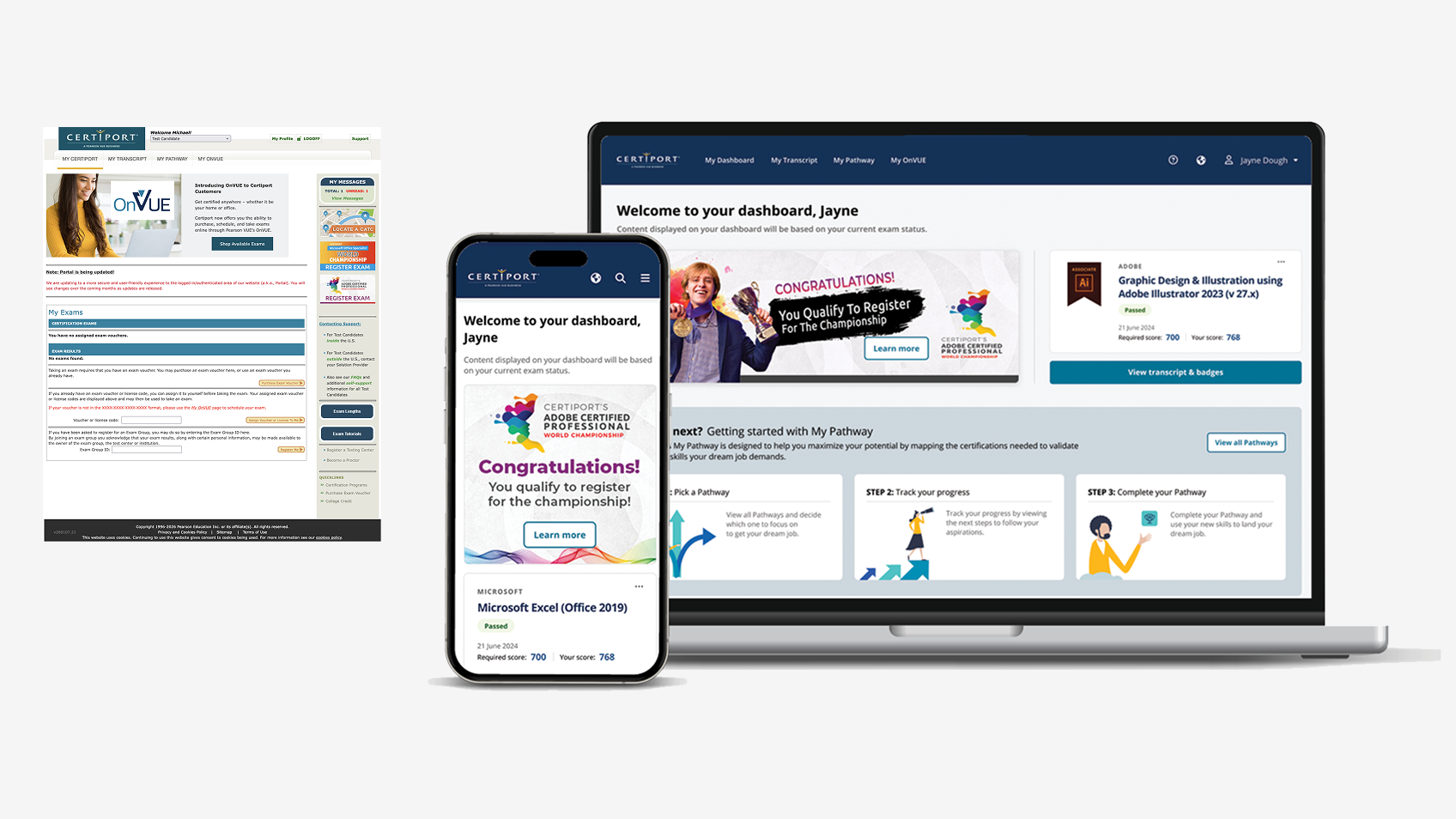
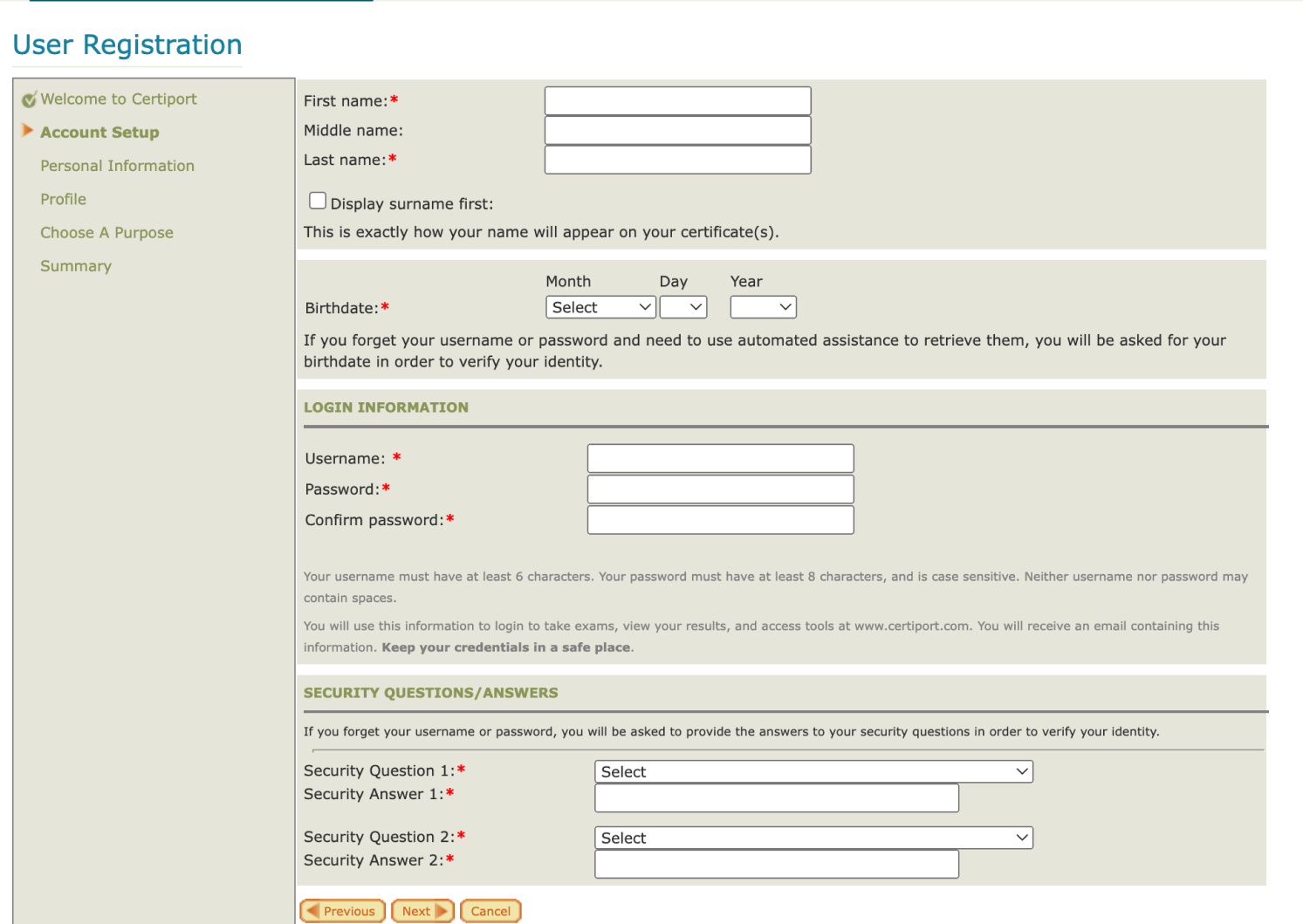
Legacy certification portal context and goals.

Where the legacy portal broke down

Administrative IA and text-heavy content burying the candidate's next step.

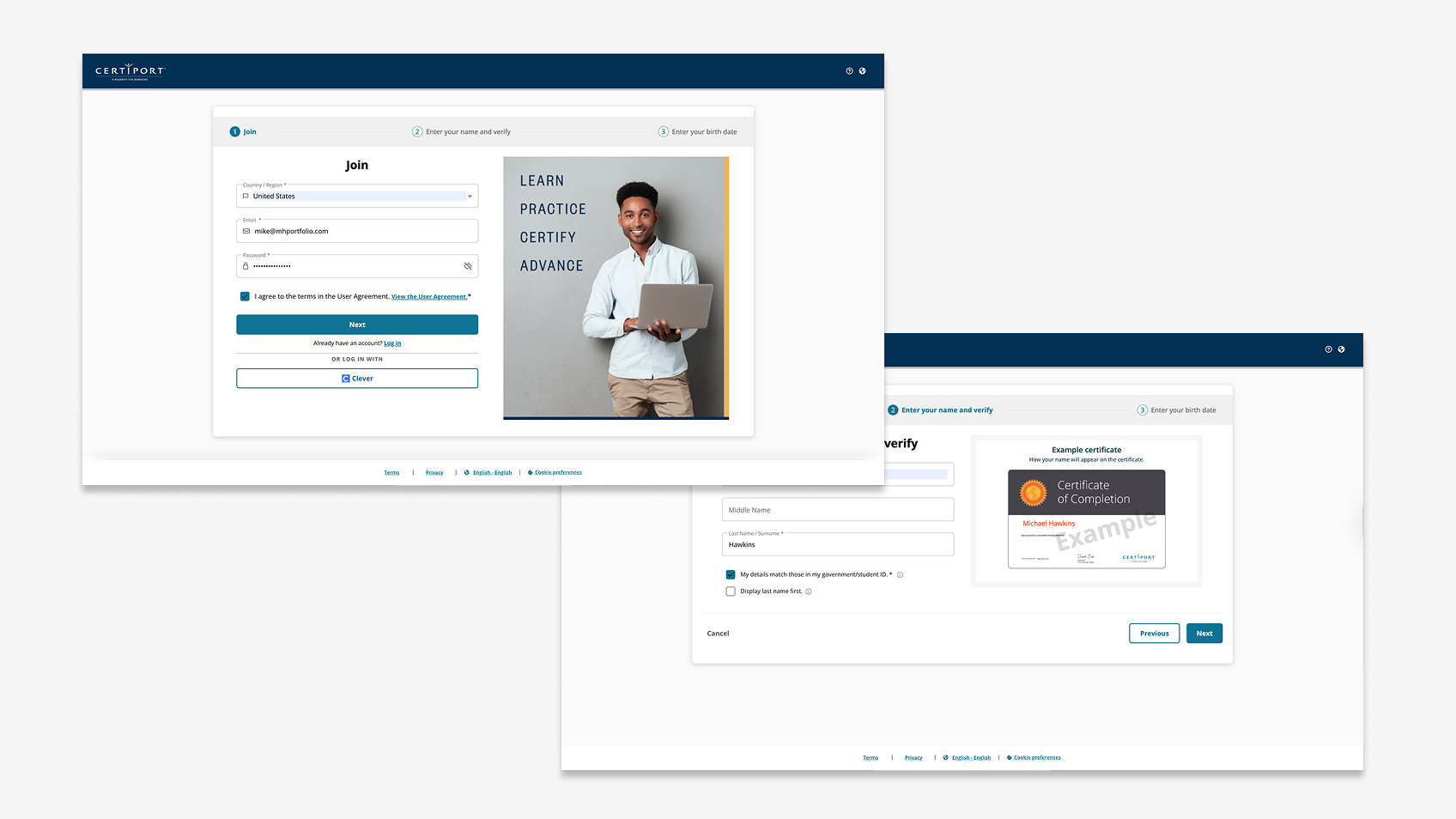
  • Cumbersome registration spread basic account creation across multiple steps - no path to a 30-second onboard.
  • Text-heavy pages walled off the content that mattered most.
  • Limited mobile accessibility on a portal whose youngest, most engaged audience increasingly arrived on a phone.
  • Low return visitor rate. Candidates logged in for an exam and never came back.
  • Inadequate ed-tech integration. K-12 candidates already lived in SSO providers like Google and Clever; the portal didn't meet them there.
  • IA organized around administrative concepts rather than the candidate's actual journey.

How I framed the sprint

Five days, fourteen people, one problem statement, six problem areas.

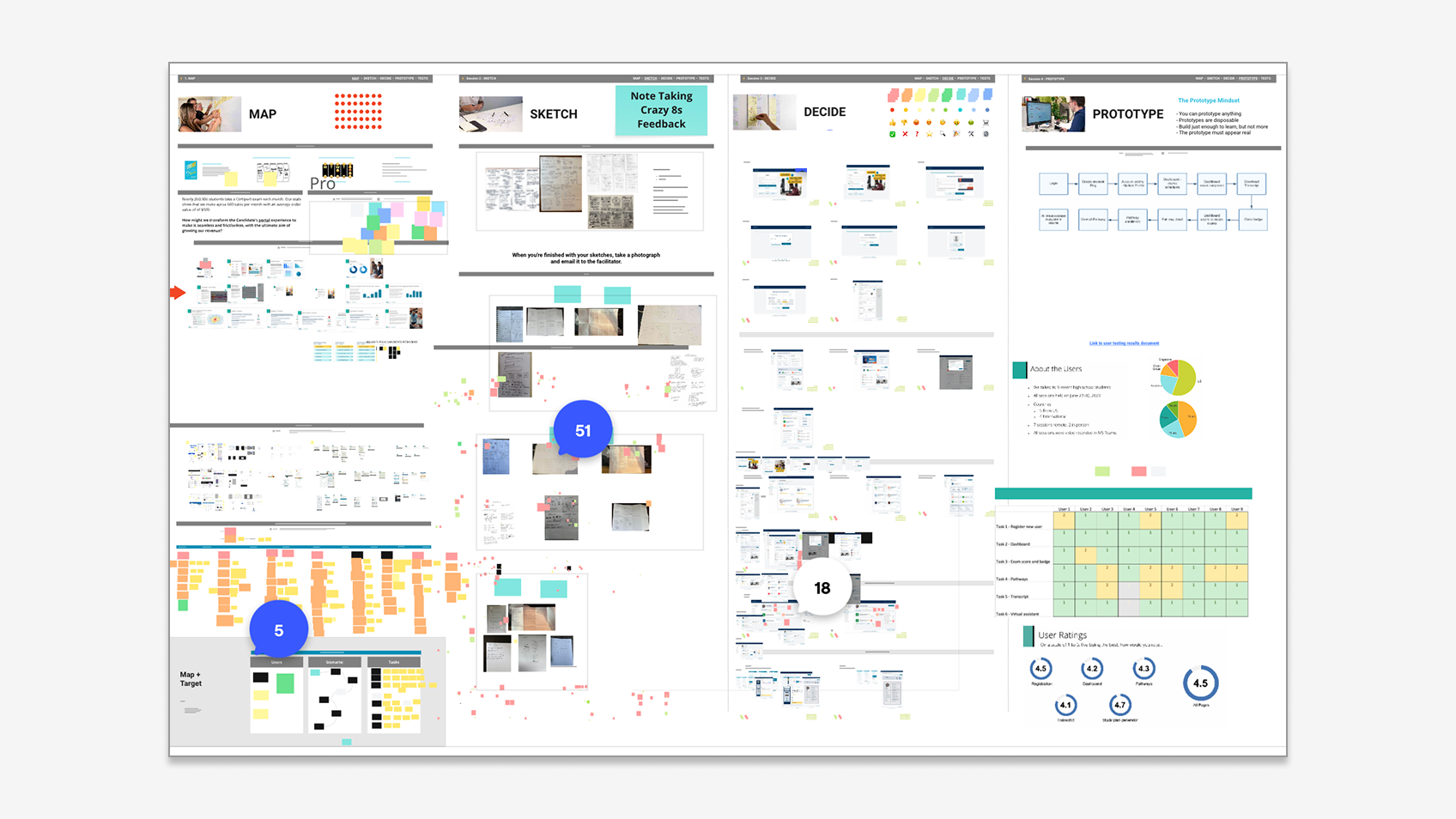
I structured the engagement around a Google Ventures-style five-day design sprint - Map → Sketch → Decide → Prototype → Test - with fourteen cross-functional partners. Day 1 anchored the team on a single problem statement. From there we segmented the portal into six problem areas so work could move in parallel: Account Creation, My Profile, Dashboard, My Pathways, Support, Badging.

Design sprint mapping, sketching, and decision artifacts.

From sketches to a tested prototype

Generative breadth, then converging fast.

Day 2 was deliberately divergent: every team member - not just designers - drafted Crazy 8s sketches across the six problem areas. We ended with 20+ sketch sets containing 120+ ideas. Day 3, the design team translated the strongest concepts into medium-fidelity wireframes. The full sprint group reviewed every artifact: 18+ "what I like" comments, 22+ improvements, 30+ dot votes. Day 4 we built a functional prototype covering registration, login, profile, dashboard, pathways, transcript, virtual assistant, and a personalized study plan. Day 5 went straight into usability testing.

What 9 candidates told us

Multi-country qualitative study that pressure-tested every screen.

9 high school and early college students, ages 15-19: 5 US, 4 international (Australia, Great Britain, Singapore). 7 remote, 2 in person.

Numeric ratings (1-5 scale): Registration 4.5, Dashboard 4.2, Pathways 4.3, Transcript 4.1, Study plan generator 4.7 (highest-rated), Overall 4.5.

Qualitative findings validated the strategic bets. Pathways landed - one participant: "I've got a 21-year-old brother who could use this site right now." The virtual assistant outperformed expectations - candidates said it would have value as a help system on its own. The personalized study plan surfaced an unexpected use case: every participant said they'd want to share their plan with their teacher.

Pain points were just as actionable: the login screen still treated returning users as primary, the transcript page lacked prominent access to printable transcripts, the pathways detail had three competing CTAs, and dashboard variation between states was confusing.

Six decisions that shaped the redesign

From sprint outputs to a coherent candidate-centered system.

1. Frictionless registration around a 30-second goal. SSO sign-in (Google, Microsoft, Clever) at parity with email/password; "Join for Free" given equal weight with "Log in."

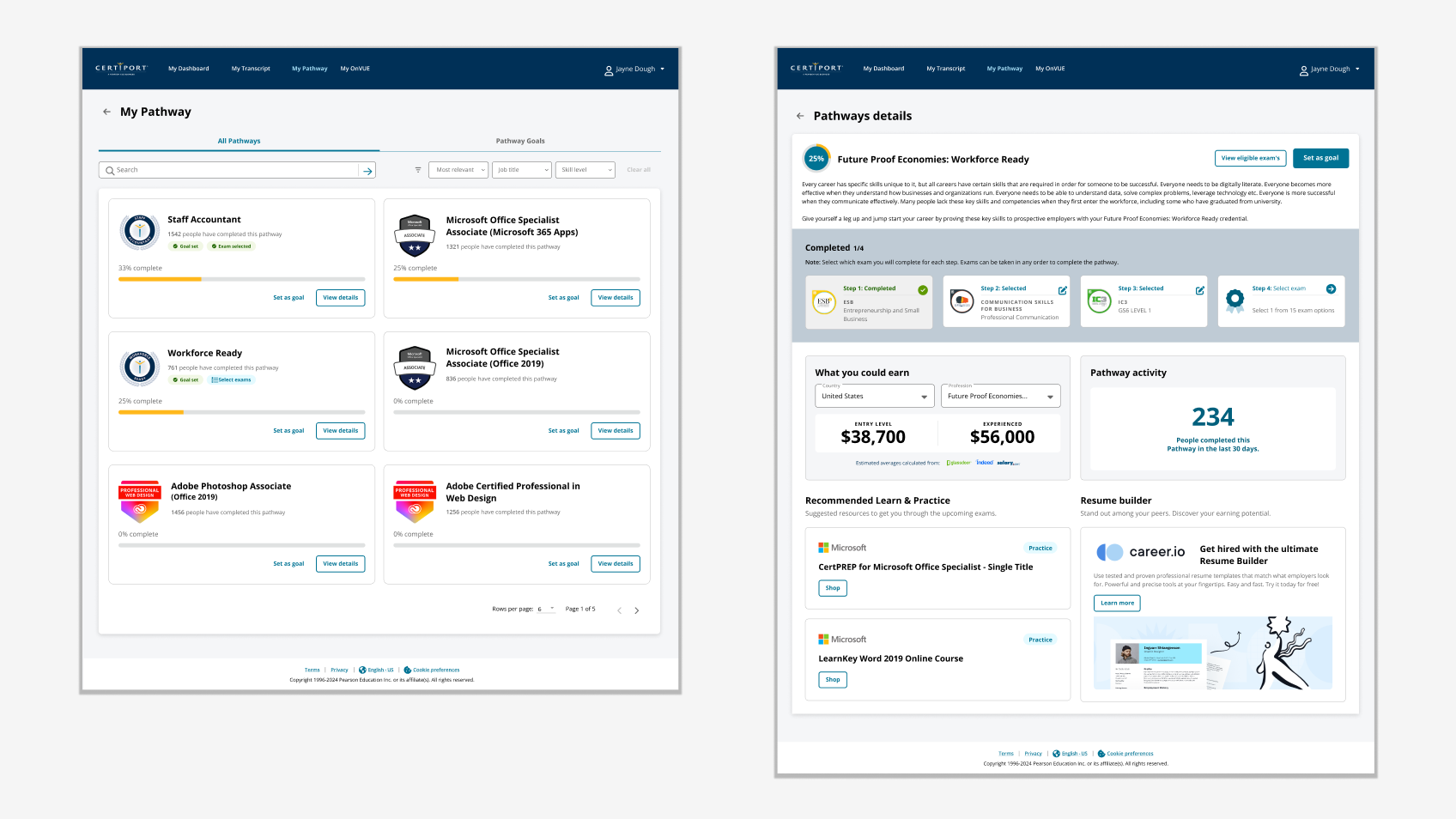
2. Pathways as the spine of the experience. Each pathway ties together steps from a starting point to a job-relevant credential, with progress, potential earnings, completion counts, and prep resources inline.

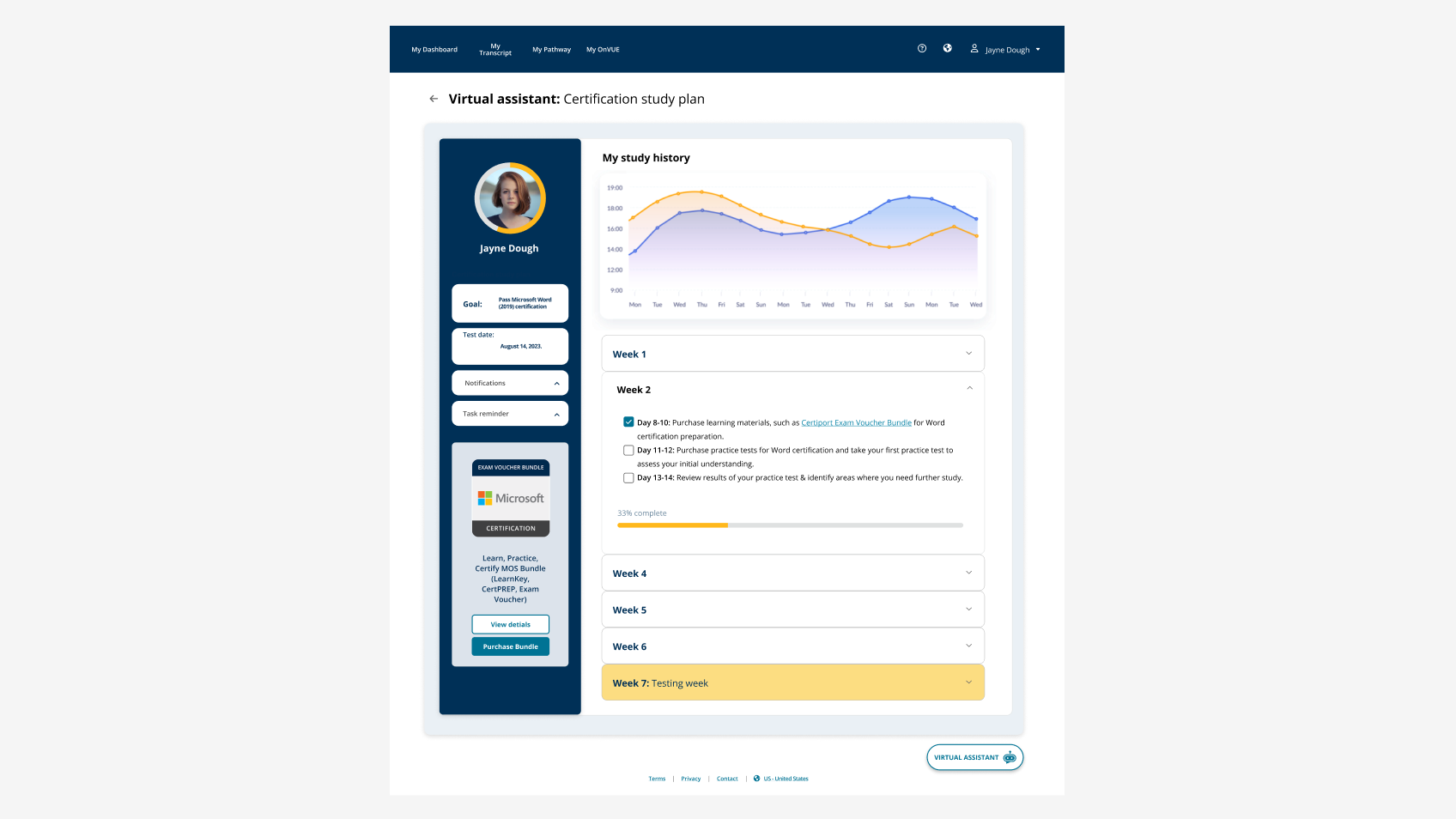
3. A virtual assistant that doubles as help and study planner. Rated 4.7 / 5; surfaced more visibly than its bottom-corner placement, with example queries to lower the activation barrier.

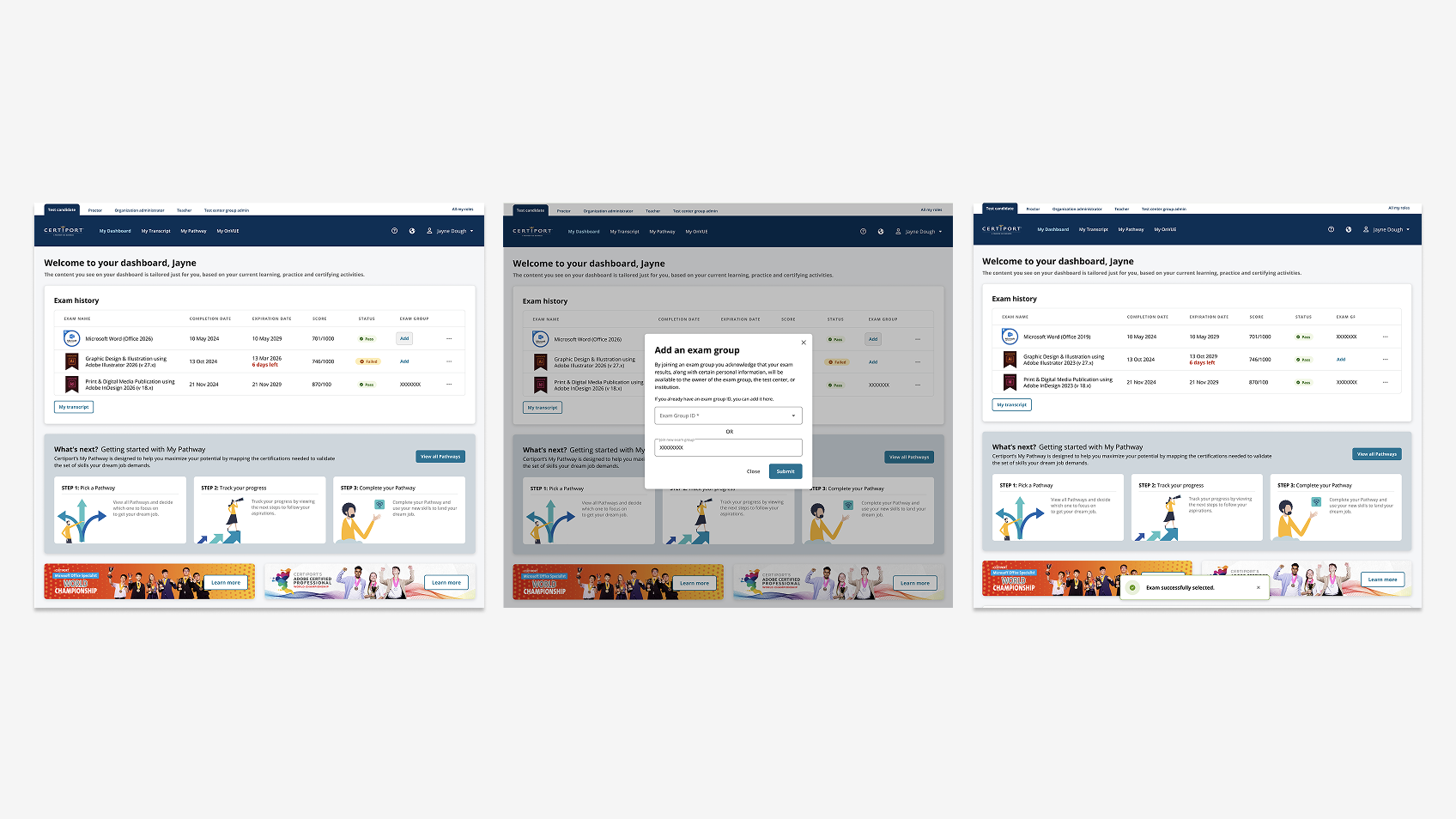
4. A consistent role-aware dashboard. Stable layout shell across states so candidates recognize the page across visits.

5. Transcript page rebuilt around the actual user task. View, print, and share certificates as primary actions, with administrative concepts deprioritized.

6. Engaging visual moments at recognition points. "Congratulations, you scored in the top 10% of candidates in your country" became a deliberately designed surface, not an afterthought.

Six redesign decisions: frictionless registration, pathways spine, virtual assistant, role-aware dashboard, transcript-centered tasks, recognition moments.

The path to development

Phased delivery negotiated with usability data, not optimism.

One of the hardest parts of legacy modernization is the all-or-nothing temptation. The team adopted a different posture: "We're letting candidates use the house as soon as it's built. Then we'll furnish it and finish the basement after they've moved in."

Phase 1 shipped the core flows that tested at 4.1 or higher: registration, login, profile, dashboard shell, transcript essentials. Phase 2 layered on pathways depth, the virtual assistant, the study plan generator, and recognition surfaces. Lower-rated refinements became specific fixes for the next cycle - not blockers for launch.

What I took from this

Modernization is a coordination problem more than a design problem.

The portal got better the moment fourteen people across six functions agreed on what "next step" meant for the candidate. A five-day sprint with the right people in the room produced more decision velocity than months of asynchronous review cycles.

The other thing I took from this: generative design moments matter even in enterprise B2B/B2C. The "Congratulations" celebration scored as one of the most-loved elements in the entire study. Candidates wanted to be celebrated when they earned something. The enterprise user is still a person, and the design contract still includes the moment of recognition - not just the moment of completion.

Outcomes
200K+
Monthly users on the portal
65%
Friction reduction in registration
4.5 / 5
Validated user satisfaction